When a customer adds the Shipping Protection add-on to their cart, it appears as a line item on the order - just like any other product. Because it isn't something you physically ship, you probably don't want it sitting on your orders as "Unfulfilled" forever, and you certainly don't want to fulfill each one by hand.
The good news: with a quick one-time setup you can have Shopify mark every Shipping Protection line item as fulfilled automatically, while leaving the physical products on the order untouched.
This guide walks you through it in two parts:
Mark the add-on as a non-physical product (so Shopify keeps it separate from your shippable goods)
Import a ready-made Shopify Flow that fulfills it automatically

Shopify splits an order into separate fulfillment orders based on whether items need shipping. By marking the Shipping Protection add-on as non-physical, Shopify automatically separates it from your real products into its own fulfillment order:
This separation is what lets the automation fulfill only the Shipping Protection — never your actual products. That's why Part 1 matters: without it, the automation would fulfill the entire order.
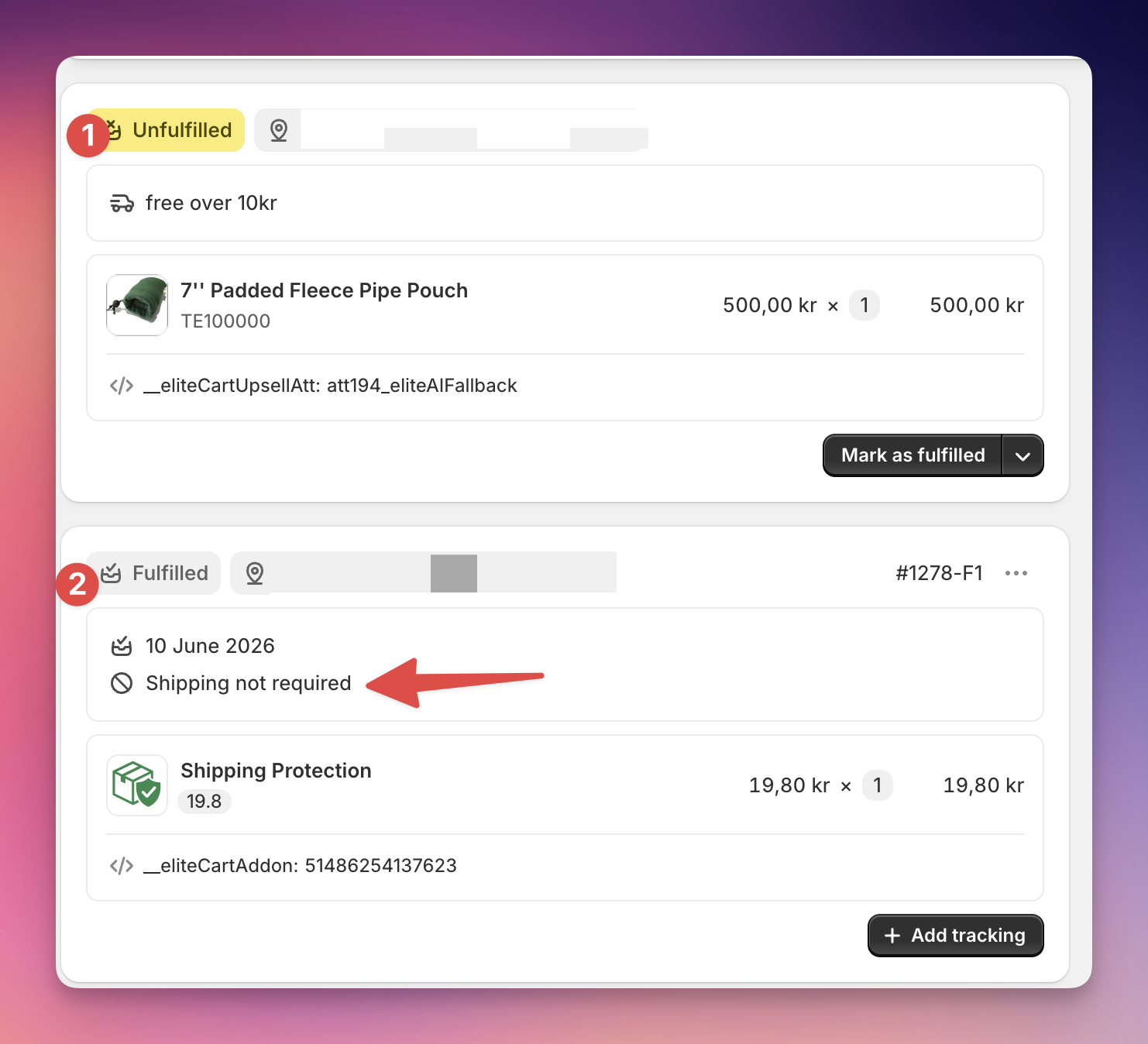
You only need to do this once.
In your Shopify admin, open the Shipping Protection product (it may also be named "Insurance").
In the variants table, select all variants (there are up to 100 of them — use the select-all checkbox at the top).
Click Bulk edit.
Click Add column (top right of the bulk editor) and add the "Physical product" column.
Uncheck / deactivate "Physical product" for every variant.
Click Save.
That's it — Shopify will now treat the add-on as a digital item and separate it into its own fulfillment order on every new order.
ℹ This change applies to new orders going forward. Orders placed before this change will keep their original fulfillment layout.
We've prepared a ready-made automation you can drop straight into the free Shopify Flow app.
Before you start: make sure the free Shopify Flow app is installed (it's free on all Shopify plans).
Download the Flow file here.
Open the Shopify Flow app in your admin.
Click Import (top right) and select the file you just downloaded.
Review the workflow, then click Turn on workflow.
From now on, whenever an order containing Shipping Protection comes in, Shopify Flow will automatically fulfill just the Shipping Protection line item, leaving the rest of the order ready for you to ship as usual.

Will this fulfill my real physical products too? No - as long as you've completed Part 1, the Shipping Protection sits in its own fulfillment order, and the automation only touches that one (and potentially other non-physical products).
Do I need a paid plan? No. Shopify Flow is free on every Shopify plan, and the Shipping Protection add-on is a normal product, so no extra apps or fees are involved.
Will this notify my customers? No, this is a setting in the flow that you could change if you wanted to.
I don't want it fulfilled automatically - is that a problem? Not at all. Leaving the add-on "Unfulfilled" has no effect on the customer or on your real products. This setup is purely to keep your orders tidy.