Show product star ratings and review counts directly on cart line items and upsell product cards, using data from your existing review app.
A review app that writes to Shopify's standard product review metafields (e.g., Judge.me, Stamped.io, Fera, Klaviyo Reviews)
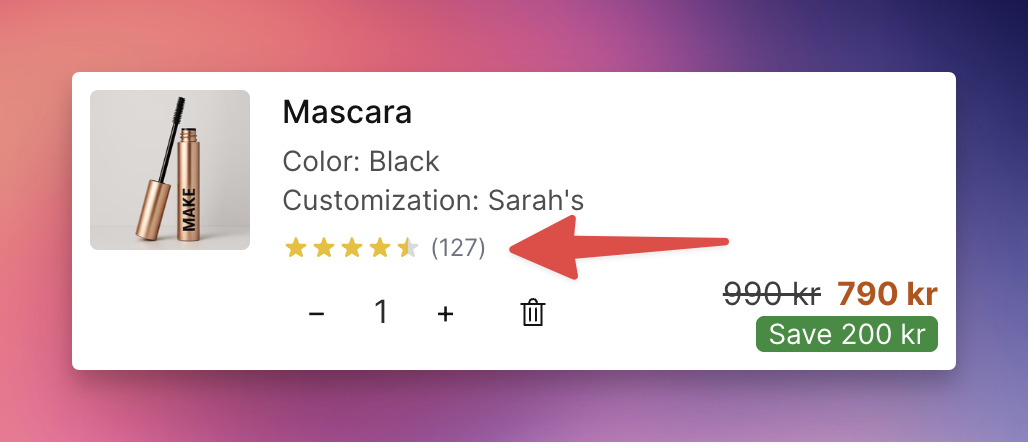
Go to Cart Designer → Layout & Function → Product reviews
Check Enable to activate the feature
Choose the Display location:
Line items & upsells — show on both
Line items only
Upsells only
Optionally enable Show text next to stars — use {count} for the number of reviews and {rating} for the average rating. Default: "({count})"
Customize Star color — the fill color for rated stars (default: #eab308, golden yellow)
Customize Empty star color — the color for unfilled stars (default: #d1d5db, light gray)
This feature reads from Shopify's standard reviews.rating and reviews.rating_count product metafields. Any review app that writes to these metafields is compatible, including:
Stamped.io (turned on upon request)
Apps that use their own proprietary systems (e.g., Trustpilot) are not compatible with this feature. For those, use EliteCart's Custom HTML section to embed their widgets instead.
Displays 1–5 stars based on the average rating, with partial star support (e.g., a 4.3 rating shows 4 full stars and one partially filled star)
Products without review data or with a rating of 0 do not show stars
Review count text (if enabled) appears next to the stars
The review text template is translatable. Go to Language & Translations to set translations for each language your store supports. Use {count} and {rating} in each translation as needed.