Replace the default EliteCart header (which shows the title "Cart" and a close button) with a custom header that displays your store's logo. This gives the cart drawer a more branded, premium feel that matches the rest of your storefront.
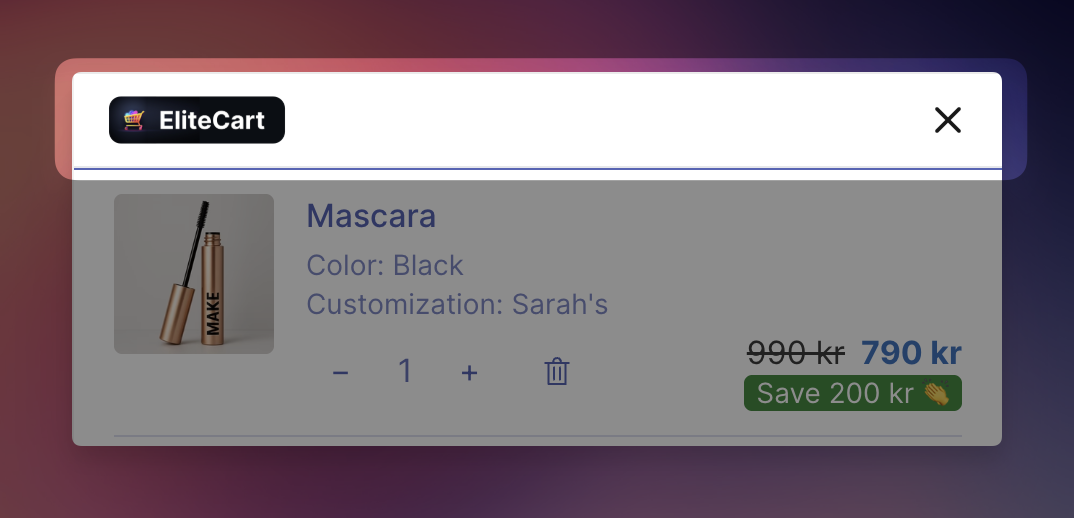
This Custom HTML section creates a new header with your logo on the left and a close button on the right. It also hides the default cart header using a small CSS snippet so that only your custom header is visible.
Go to EliteCart → Cart Designer → Custom HTML
Enable the "Above cart" section
Paste the following code
Replace the image URL with a link to your store's logo
<header style="border-bottom: 1px solid #e5e7eb;" class="tw-flex tw-items-center tw-justify-between tw-px-4 tw-py-1 tw-bg-secondary tw-sticky tw-top-0 tw-z-10">
  <div class="tw-flex tw-items-center">
    <img
      src="https://elitecart.app/elitecart-logo.png"
      alt="Store logo"
      style="height: 25px; width: auto; object-fit: contain; display: block;"
    />
  </div>

  <button
    id="elite-cart-close-btn"
    aria-label="Close cart"
    class="tw-flex tw-items-center tw-justify-center tw-cursor-pointer tw-rounded-md tw-p-2 tw-transition-colors tw-duration-200"
    style="background: none; border: none; color: #191919; line-height: 1; margin-right: -8px;"
  >
    <svg xmlns="http://www.w3.org/2000/svg" width="22" height="22" viewBox="0 0 24 24" fill="none" stroke="currentColor" stroke-width="2" stroke-linecap="round" stroke-linejoin="round" aria-hidden="true">
      <line x1="18" y1="6" x2="6" y2="18"/>
      <line x1="6" y1="6" x2="18" y2="18"/>
    </svg>
  </button>
</header>

<script>
  (function () {
    var btn = document.getElementById('elite-cart-close-btn');
    if (btn) {
      btn.addEventListener('click', function (e) {
        e.preventDefault();
        e.stopPropagation();
        if (window.EliteCart) window.EliteCart.closeDrawer();
      });
    }
  })();
</script>

<style>
  .ec-header-title {
    display: none;
  }
  .ec-header-close-button {
    display: none;
  }
  .ec-reward-bar-text {
    margin-top: 12px;
  }
</style>

Or manually, change the logo: Replace the src URL with a link to your own logo image. You can use any publicly hosted image — for example, upload your logo to Shopify under Settings → Files and copy the CDN URL.
<img
  src="https://cdn.shopify.com/s/files/1/YOUR-STORE/files/your-logo.png"
  alt="Store logo"
  style="height: 25px; width: auto; object-fit: contain; display: block;"
/>
Adjust the logo size: Change the height value to make the logo bigger or smaller:
style="height: 35px; ..."   /* larger logo */
style="height: 20px; ..."   /* smaller logo */
Change the background color: Replace tw-bg-secondary with another Tailwind color class, or use an inline style:
<!-- White background -->
<header style="border-bottom: 1px solid #e5e7eb; background: #ffffff;" class="tw-flex tw-items-center tw-justify-between tw-px-4 tw-py-1 tw-sticky tw-top-0 tw-z-10">

<!-- Dark background (also change close button color) -->
<header style="border-bottom: 1px solid #333; background: #111;" class="tw-flex ...">
If using a dark background, update the close button color to white:
style="background: none; border: none; color: #ffffff; ..."
Remove the bottom border: Delete border-bottom: 1px solid #e5e7eb; from the header's inline style.
The <style> block hides the default EliteCart header elements so they don't appear alongside your custom header:
.ec-header-title — hides the default "Cart" title
.ec-header-close-button — hides the default close button (since we have our own)
.ec-reward-bar-text — adds a small top margin to the reward bar text so it doesn't sit too close to the new header
The close button uses window.EliteCart.closeDrawer() to close the cart drawer, the same API the default close button uses.
Make sure your logo image is hosted on a fast CDN (Shopify's file hosting works great) to avoid slow loading.
If your store supports multiple languages, you can use the Make Translatable feature to show different logos per language — for example, a localized version of your brand mark.
Want to make visual changes? Use our integrated AI to adjust colors, sizing, spacing, or add extra elements like a tagline below the logo.