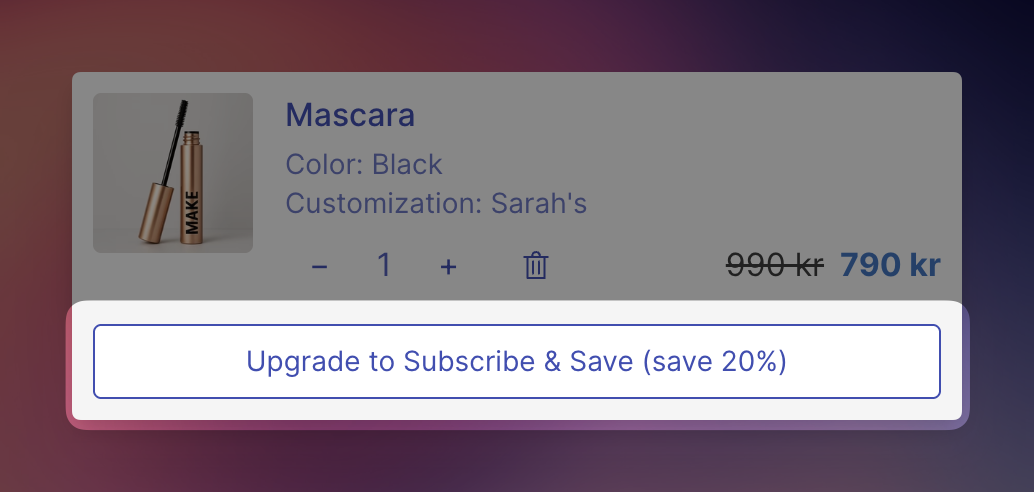
Subscription Upgrades lets customers convert one-time purchases to subscription plans without leaving the cart. When enabled, a "Subscribe & Save" button appears below eligible cart line items, displaying the available savings percentage. After subscribing, customers can switch between subscription frequencies using a dropdown selector.
This feature requires products with active selling plans configured through a Shopify subscription app (such as Recharge, Shopify Subscriptions, or similar).
Open Cart Designer in your EliteCart dashboard
Select Subscription upgrades from the left navigation menu
Toggle Enable to activate the feature
Click Save to apply changes
When enabled, customers who have already selected a subscription plan cannot switch back to a one-time purchase. They can still switch between different subscription frequencies.
Use case: Enable this when you want to encourage subscription retention and prevent customers from changing their mind at checkout.
When a customer adds a product with available selling plans to their cart:
A "Subscribe & Save" button appears below the line item
The button displays the maximum savings percentage available (e.g., "Upgrade and save 15%")
Clicking the button automatically applies the subscription plan with the highest discount
The button transforms into a dropdown for plan management
When a line item already has a subscription plan:
A dropdown selector displays the current plan
Customers can switch between available subscription frequencies
If downgrade prohibition is disabled, customers can also select "One-time only" to remove the subscription
The subscription upgrade option only appears when:
The product has selling plans configured in Shopify
The variant has selling plan allocations
At least one subscription plan offers a lower price than the one-time purchase price
Navigate to Language & Translations in your EliteCart dashboard. The following texts can be customized:
Field | Default | Description |
Upgrade button text | "Upgrade and save {percentage_savings}" | Button text for one-time purchases. Use |
Pay full price header | "Pay full price" | Group title for the one-time purchase option in the dropdown |
Subscribe header | "Subscribe and Save" | Group title for subscription plans in the dropdown |
One-time option | "One-time only" | Label for the one-time purchase option |
Upgrading text | "Upgrading..." | Loading state when switching to a subscription |
Downgrading text | "Downgrading..." | Loading state when switching to one-time purchase |
Error message | "Failed to update subscription" | Displayed when plan change fails |
The subscription upgrade button inherits your cart design colors by default:
Border and text color inherit from your primary text color
Background is white with a subtle hover effect
For advanced customization, add custom CSS in the Custom CSS section targeting:
.ec-subscription-upgrade-container - Main wrapper
.ec-subscription-upgrade-button - Subscribe button
.ec-subscription-upgrade-select - Dropdown selector
Example: Change button style to filled
.ec-subscription-upgrade-button {
  background-color: black;
  color: white;
}
For multi-language stores, click the translation icon beside each text field on the Language & Translations page to provide localized versions. The subscription upgrade interface automatically displays in the customer's selected language.
Q: Why doesn't the subscription option appear for my products?
Products must have selling plans configured through a Shopify subscription app. Check your subscription app settings and verify the product has active selling plan groups.
Q: Why do some variants not show the upgrade option?
Each variant must have selling plan allocations configured. Some subscription apps require per-variant setup.
Q: The button shows 0% savings. Why?
The savings percentage is calculated by comparing the one-time price with the subscription per-delivery price. If prices are equal or the subscription is more expensive, the upgrade option will not appear.
Q: Can customers apply discount codes to subscription items?
Yes, discount codes work normally with subscription items, though specific rules depend on your subscription app and Shopify discount configuration. EliteCart has no influence on this behavior.