Integrate Onward's post-purchase protection service that combines package protection, loyalty rewards, and carbon-neutral shipping into a single cart add-on.
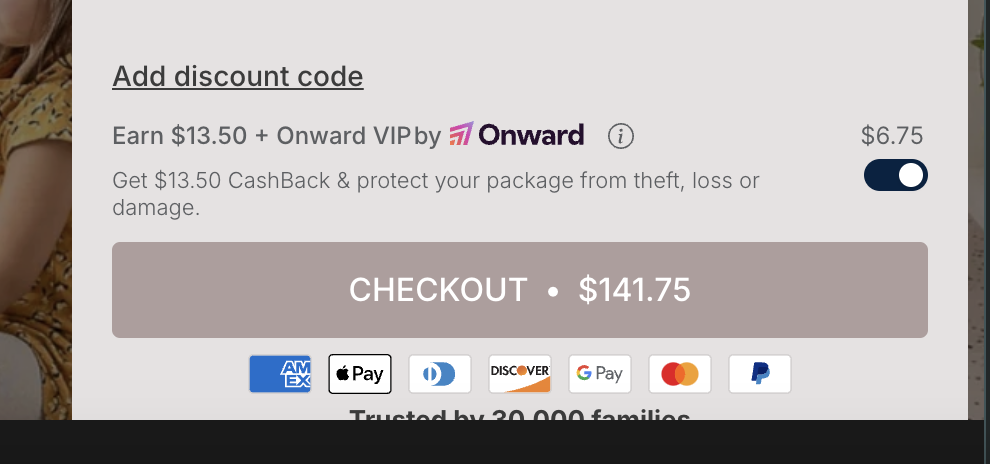
Package protection services can increase average order value while reducing customer service inquiries about lost or damaged shipments. Onward combines traditional shipping protection with loyalty rewards and environmental benefits, making it more appealing for customers to opt-in. The revenue-sharing model means no upfront SaaS fees.
Onward VIP Protection+ adds an opt-in widget near your checkout button. When customers select it, they get:
Protection against lost, damaged, or stolen packages
Loyalty rewards points for future purchases
Carbon-neutral shipping offset
Extended satisfaction guarantees
The integration uses JavaScript to inject the protection option into EliteCart's checkout area. Onward handles all claim processing and customer service related to protected orders.
Onward VIP Protection+ account
EliteCart Professional account
Access to edit theme files
Install Onward VIP Protection+ from Shopify App Store
Complete onboarding with Onward team
Configure your protection plans and pricing
In Shopify Admin, go to Online Store → Themes
Click Actions → Edit code on your active theme
Open theme.liquid
Add before closing </body> tag:
<script>
window.addEventListener('DOMContentLoaded', () => {
  const onward = new OnwardSetup();

  onward.addContainer('.ec-checkout-buttons-container', { position: 'afterbegin' });
  onward.attachCheckoutButton('.ec-checkout-buttons-container button[name="checkout"]', {
    optOutSelector: '.ec-checkout-buttons-container',
    optOutPosition: 'beforeend'
  });
});
</script>
The code targets EliteCart's checkout button container (.ec-checkout-buttons-container)
Protection widget appears above the checkout button
Opt-out option displays below the checkout button
Onward automatically handles responsive design and styling
The integration works by:
Waiting for DOM to load completely
Creating an Onward instance
Injecting the protection widget into EliteCart's checkout area
Attaching event listeners to the checkout button
Handling opt-in/opt-out state management
Onward's script manages all the heavy lifting including:
Price calculations based on cart total
API calls to their backend
Adding protection as a line item
Tracking and analytics
Onward operates on a revenue-sharing basis:
No monthly SaaS fees
You earn a percentage of each protection sale
Onward handles all claims and customer service
Transparent reporting in their dashboard
Contact Onward's support team for:
Custom styling to match your brand
Adjusting widget positioning
Modifying protection plan options
Setting up A/B tests
Save changes to theme.liquid
Open your store in incognito mode
Add products to cart
Open cart and look for protection widget above checkout
Test opt-in and opt-out functionality
Verify protection adds to order total
Complete test purchase to confirm integration
Common issues:
Widget not appearing: Check browser console for JavaScript errors
Wrong position: Verify EliteCart's checkout container class hasn't changed
Styling conflicts: Contact Onward support for CSS adjustments